Downloading and Installing the Application:
- Download the installer for the Enplug Screensaver software.
- Once you have downloaded the installer, open the file to begin the installation process.
- Click Next.
- Select I Agree to license agreement.
- Once download is complete, tick the Run "Enplug Screen Saver", click Finish. This will open the application and request a Content URL.
- The Computer will require Internet Access
Entering the Content URL:
- Open the Display Group that this screen saver will be runnin gunder
- Create a new Content URL
- Copy the Content URL and paste into the Screen Saver Application.
- Ensure "Close on Mouse Movement" is ticked.
- Press OK.
Running the Screen Saver Application:
- Search up Screen Saver in your Windows Search bar.
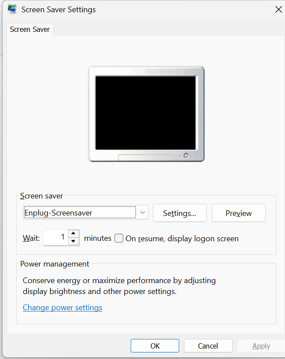
- Ensure that the Screen Saver selected is Enplug-Screensaver
- Change the Number of Minutes to Wait before Resuming to an appropriate amount.
- Do not move the mouse for the chosen number of minutes and the Screen Saver will activate and play the allocated content in the Display Group
- To Stop the screen saver, move your mouse
Stopping the Screen Saver:
To temporarily stop the Screen Saver, move your mouse.
To stop the Screen Saver from activating, in the Screen Saver Settings, change the dropdown Box Option from Enplug-Screensaver to (None) and press Apply.